

Download CoachStat Baseball 2 – Advanced Baseball Statistics Tool for Mac
Overview
CoachStat Baseball 2 is a full‑featured statistical analysis program built specifically for Mac users who are serious about baseball coaching, scouting, or player development. Developed by veteran baseball analyst Roger Clary, the software delivers a powerful yet intuitive interface that lets coaches turn raw game data into actionable insights. Whether you’re managing a Little League squad, a high‑school team, or a semi‑professional club, CoachStat Baseball 2 offers a complete suite of tools for tracking player performance, generating detailed reports, and visualizing trends over a season.
The program is offered in English and aligns with the latest Mac operating systems, ensuring a secure, stable, and future‑proof experience. Its robust feature set includes real‑time scoring, advanced metric calculations (such as wOBA, BABIP, and WAR), custom report templates, and a flexible import/export system that works with CSV, Excel, and popular baseball data formats. Because the software is a “full version” release, users receive unlimited access to all modules, regular updates, and dedicated customer support—all without the constraints of a trial or limited‑feature version.
In short, CoachStat Baseball 2 is designed to be the go‑to statistical engine for any baseball organization looking to leverage data for better decision‑making on the field.
Key Features of CoachStat Baseball 2
- Comprehensive Game Scoring: Real‑time entry of at‑bat events, pitch locations, and defensive positions.
- Advanced Metrics Engine: Calculates modern sabermetric stats such as wOBA, wRC+, BABIP, FIP, and WAR.
- Custom Report Builder: Drag‑and‑drop interface to create player, team, and league reports in PDF or Excel.
- Data Import/Export: Seamless import from CSV, Excel, and major league data feeds; export for further analysis.
- Season & Tournament Management: Schedule creation, roster handling, and automatic statistical aggregation.
- Graphical Visualizations: Interactive charts, heat maps, and trend lines for performance tracking.
- Multi‑User Access: Role‑based permissions for coaches, assistants, and analysts.
- Secure Cloud Backup: Optional encrypted backup to keep your data safe and accessible.
- Regular Updates: Free lifetime updates that keep the software compatible with the latest macOS releases.
- Dedicated Support: Email and forum support from the developer and an active user community.
Each of these features is purpose‑built to reduce the manual grunt work that traditionally accompanies baseball stat‑keeping. For instance, the Advanced Metrics Engine eliminates the need for separate spreadsheet formulas, while the Custom Report Builder lets coaches generate scouting reports in minutes rather than hours. The inclusion of cloud backup also addresses the growing concern around data loss, giving users peace of mind that season‑long statistics are preserved even if a local machine fails. Together, these capabilities make CoachStat Baseball 2 a truly comprehensive tool for anyone who wants to turn numbers into winning strategies.
Installation, Usage, and Compatibility
Installing CoachStat Baseball 2 on a Mac is straightforward and designed for users of all technical backgrounds. After purchasing the software, you’ll receive a secure download link via email. Click the link to download the .dmg installer, then double‑click the file to mount the disk image. Drag the CoachStat Baseball 2 icon into your Applications folder, and macOS will prompt you to confirm the installation. Because the program is notarized by Apple, you’ll encounter minimal security warnings; simply allow the app to run from your Security & Privacy settings if prompted.
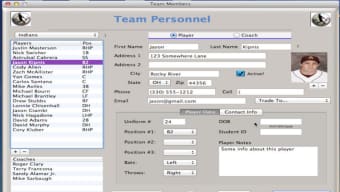
Once installed, launch CoachStat Baseball 2 from the Applications folder. The first run initiates a brief setup wizard where you can import existing data files, create a new team roster, or start a fresh season. The wizard walks you through selecting your preferred measurement units (imperial or metric), setting up player positions, and configuring default report templates. After setup, the main dashboard presents a clean, tab‑based layout: Scoreboard, Players, Reports, and Settings. Scoring a game is as simple as selecting the current batter, entering the outcome (single, double, strikeout, etc.), and clicking “Submit.” The software instantly updates player stats and refreshes visual charts in real time.
CoachStat Baseball 2 is optimized for macOS 11 (Big Sur) and later, including macOS Ventura and macOS Sonoma. It runs natively on Apple Silicon (M1, M2, and later) and Intel‑based Macs, taking advantage of the latest hardware acceleration for smooth chart rendering. Minimum system requirements are a 2 GHz dual‑core processor, 4 GB RAM, and 500 MB of free disk space. The application also supports integration with external devices such as Bluetooth scoreboards and QR‑code scanners, making it adaptable to both traditional and high‑tech baseball environments.
For ongoing use, CoachStat Baseball 2 checks for updates automatically each time you launch the program. When a new version is available, a discreet notification appears, allowing you to download and install the update with a single click. This ensures that you always have the latest statistical formulas and macOS compatibility patches, without the hassle of manual version tracking. Overall, the installation process is quick, the user interface is intuitive, and the software remains stable across all supported Mac hardware configurations.
Pros and Cons
Pros
- All‑in‑one solution for scoring, analytics, and reporting.
- Modern sabermetric calculations built‑in, eliminating the need for external spreadsheets.
- Intuitive Mac‑native UI that respects Apple design guidelines.
- Full compatibility with both Intel and Apple Silicon Macs.
- Free lifetime updates keep the software current with baseball analytics trends.
- Secure cloud backup option protects season‑long data.
- Comprehensive customer support and active user community.
Cons
- Price point may be higher than basic scorekeeping apps for casual coaches.
- Learning curve for users unfamiliar with advanced metrics.
- No native Windows or mobile (iOS/Android) version—Mac‑only focus.
- Requires macOS 11 or later, limiting use on older Macs.
- Initial setup wizard can feel overwhelming if importing large historical data sets.
CoachStat Baseball 2 delivers a professional‑grade statistical platform that feels right at home on a Mac. While the price may deter hobbyists, the depth of analysis, seamless macOS integration, and ongoing support make it a worthwhile investment for serious coaches and analysts.
Frequently Asked Questions
Is CoachStat Baseball 2 a one‑time purchase or a subscription?
CoachStat Baseball 2 is sold as a one‑time purchase. The price includes lifetime access to all features and free updates for future macOS releases.
Can I import data from other baseball scoring apps?
Yes. CoachStat Baseball 2 supports CSV and Excel imports, allowing you to bring in data from popular scoring tools like GameChanger, Baseball Statistix, or custom spreadsheets.
Does the software work on Apple Silicon Macs?
Absolutely. The application runs natively on M1, M2, and later Apple Silicon chips, delivering fast performance and low power consumption.
Is there a trial version available?
CoachStat Baseball 2 is sold as a full version only; however, the developer offers a 14‑day money‑back guarantee if you are not satisfied with the product.
How secure is the cloud backup feature?
The cloud backup uses end‑to‑end AES‑256 encryption, ensuring that your data is protected both in transit and at rest.
Conclusion – Take Your Baseball Coaching to the Next Level
If you’re a Mac‑based coach, scout, or analyst looking for a reliable, feature‑rich platform to capture and interpret baseball statistics, CoachStat Baseball 2 stands out as a top choice. Its blend of real‑time scoring, advanced sabermetrics, and powerful reporting tools provides everything you need to turn raw data into strategic advantage. While the price reflects its professional capabilities, the lifetime updates, secure cloud backup, and dedicated support add tangible value that can pay for itself over multiple seasons. Ready to upgrade your coaching toolkit? Download CoachStat Baseball 2 now and start transforming your team's performance with data‑driven insights today.







